Q7 Launcher — Fast Rust-based Linux and Windows App Launcher and App Menu
██████   ███████        ██       █████  ██    ██ ███    ██  ██████ ██   ██ ███████ ██████
██    ██        ██      ██      ██   ██ ██    ██ ████   ██ ██      ██   ██ ██      ██   ██
██    ██        ██      ██      ██   ██ ██    ██ ██ ██  ██ ██      ██   ██ ██      ██   ██
██    ██       ██  ████ ██      ███████ ██    ██ ██ ██  ██ ██      ███████ █████   ██████
██ ▄▄ ██      ██        ██      ██   ██ ██    ██ ██  ██ ██ ██      ██   ██ ██      ██   ██
 ██████      ██         ███████ ██   ██  ██████  ██   ████  ██████ ██   ██ ███████ ██   ██
    ▀▀▀▀
                                      Q7-LAUNCHER
A minimal, fast cross-platform launcher for Linux and Windows, built in Rust using eframe/egui. Features fuzzy search, file search, configurable web prefixes, and theme switching for a snappy desktop experience.
Download from GitHub Releases:
q7-launcher-linux-x86_64.tar.gz q7-launcher-windows-x86_64.zip git clone https://github.com/quadeer2003/q7-rust-launcher.git
cd q7-rust-launcher
cargo build --release
# Run
./target/release/q7-launcher # Linux
target\\release\\q7-launcher.exe # Windowsfd and rsvg-convert for enhanced features.Setup Hotkeys
Configure a global hotkey to launch Q7 Launcher instantly from anywhere on your system. Common choice: Super + Space
Linux
Add to your i3/sway config:
bindsym $mod+space exec --no-startup-id /absolute/path/to/q7-launcher/target/release/q7-launcher

# Optional: Floating window rules
for_window [title="^q7 launcher$"] floating enable, focus, move position center, sticky enable, border pixel 0Create a custom keybinding:
gsettings set org.gnome.settings-daemon.plugins.media-keys custom-keybindings "['/org/gnome/settings-daemon/plugins/media-keys/custom-keybindings/q7launcher/']"
gsettings set org.gnome.settings-daemon.plugins.media-keys.custom-keybinding:/org/gnome/settings-daemon/plugins/media-keys/custom-keybindings/q7launcher/ name 'q7 Launcher'
gsettings set org.gnome.settings-daemon.plugins.media-keys.custom-keybinding:/org/gnome/settings-daemon/plugins/media-keys/custom-keybindings/q7launcher/ command '/home/you/bin/q7-launcher'
gsettings set org.gnome.settings-daemon.plugins.media-keys.custom-keybinding:/org/gnome/settings-daemon/plugins/media-keys/custom-keybindings/q7launcher/ binding '<Super>space'System Settings → Shortcuts → Custom Shortcuts → Add Command:
Meta+Space /path/to/q7-launcher Settings → Keyboard → Application Shortcuts → Add:
/path/to/q7-launcher/target/release/q7-launcherBind to Super+Space or your preferred combination
Windows
Create q7-hotkey.ahk:
; Launch q7 launcher with Win+Space
#Space::
Run, C:\\Path\\To\\q7-launcher.exe
return
Run AutoHotkey and double-click the script. For autostart, place in %AppData%\Microsoft\Windows\Start Menu\Programs\Startup
Alternative method:
Usage
App Search
Simply type the name of any installed application. Use fuzzy search - type partial names and Q7 will find matching apps.
File Search
Prefix with f to search files:
f document.pdf - Find document.pdff *.txt - Find all text filesWeb Search
Use built-in search prefixes:
? rust programming - DuckDuckGog rust programming - Googleyt rust tutorial - YouTubegh rust-lang/rust - GitHubso rust error - Stack Overfloww rust language - WikipediaThemes & Commands
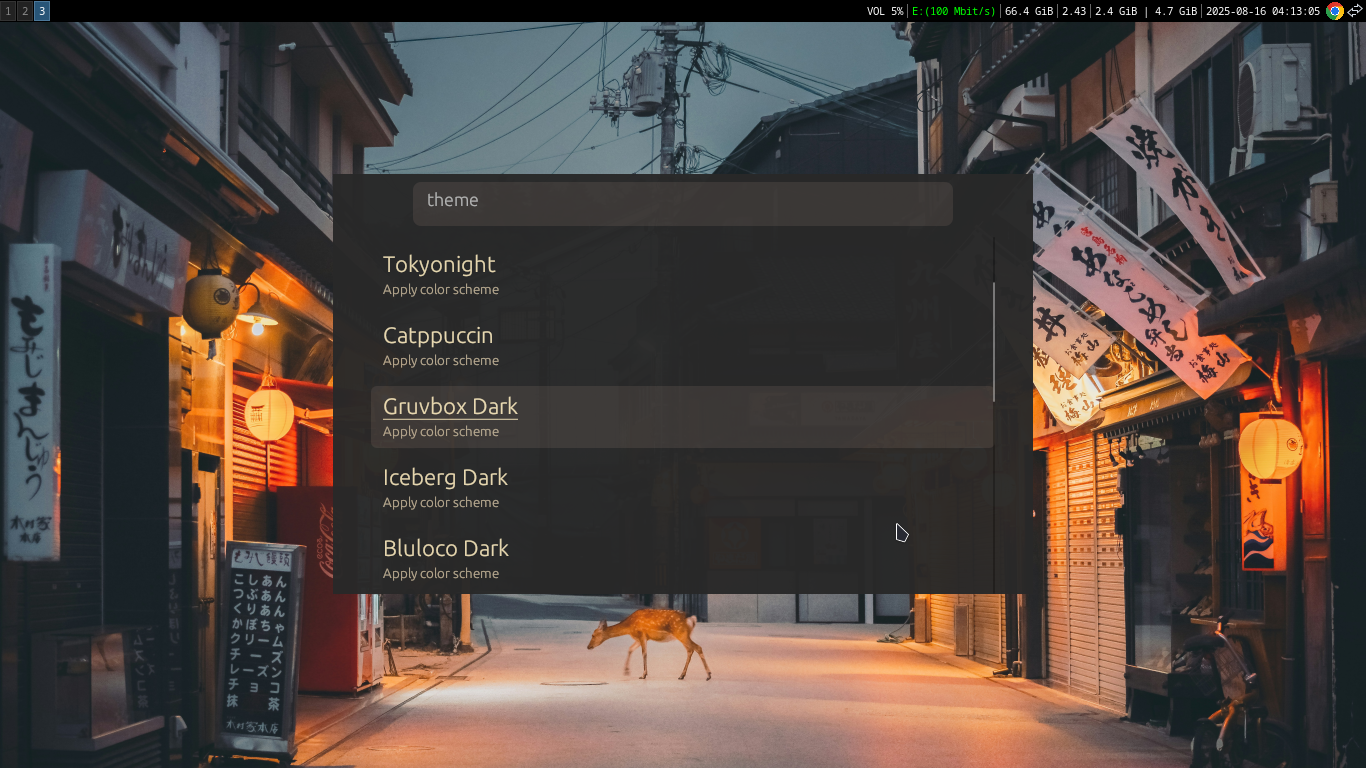
Type theme to browse and switch between built-in color schemes. Any unrecognized input will be executed as a system command.
Custom Search Engines
Create ~/.config/q7-launcher/config.json to define custom search engines:
{
  "search_engines": [
    { "name": "DuckDuckGo", "prefix": "?",  "url": "https://duckduckgo.com/?q=%s" },
    { "name": "Google",     "prefix": "g ", "url": "https://www.google.com/search?q=%s" },
    { "name": "StackOverflow","prefix": "so ","url": "https://stackoverflow.com/search?q=%s" },
    { "name": "Rust Docs",  "prefix": "rs ", "url": "https://doc.rust-lang.org/std/?search=%s" }
  ]
}
The %s placeholder is replaced with your search term. First matching prefix wins.
Features
?, g, yt, w, gh, so and more theme to browse built-in color schemes Screenshot
Single input bar with fuzzy search and keyboard navigation
Troubleshooting & Tips
Performance Tips
- • Always build with
--releaseflag for optimal speed - • On Linux, install
fd(fd-find) for faster file search - • Install
rsvg-convertfor better SVG icon rendering - • Consider stripping debug symbols to reduce binary size
Window Positioning Issues (Linux)
If the launcher window doesn't center properly, check the window title:
xprop | grep -E 'WM_NAME|_NET_WM_NAME'Update your window manager rules to match the actual title if needed.
Windows Notes
- • Start Menu scan happens at startup - large environments may see slight delay
- • Icon extraction for .exe files is planned but not yet implemented
- • PowerShell search depth is limited for performance - adjust in source if needed
Requirements
Mandatory:
- • Rust toolchain (rustup.rs)
Optional (Linux):
- •
fd(fd-find) for enhanced file search - •
rsvg-convertfor SVG icon rendering
Source code: github.com/quadeer2003/q7-rust-launcher